
 This week I was able to go back to my own content area and review an iOS app for High School Spanish. The app is called "High School Spanish - 5 Essential Tools to Study Spanish & Learn Vocabulary!" By Common Ground International.
Overview: This app is very good at what it does. For $4.99 I would recommend it to my students as a companion app to my classroom. Teachers and students should not expect it to be a stand alone app or a magic bullet. But when used with a strong curriculum, talented instructor, and ambitious student, this app is one of the best apps I've seen for Spanish students enrolled in Spanish levels 1 through 5.
Upon first launch, the app brought me to the screen below. It seemed to be downloading the dictionary onto my iPhone. While connected to wifi this download/sync screen lasted for about 5-10 minutes.

The app has 5 main sections or tools. They are all represented in the 5 icons at the bottom of the screen. The dictionary is pretty cool it has a very comprehensive library of vocabulary words. The user can click the speaker icon on any word to hear proper pronunciation. It seems that this feature requires an internet connection to stream the pronunciation. Clicking the checkmark icon enables the user to copy that word into a user-made folder of vocabulary words.

The Writing Tips tool contains tips and instructions to help students with writing in specific circumstances. I think this would be a nice reference guide for students taking AP classes.

The grammar tool is a collection of explanations and text-based tutorials on the grammar elements seen below.

The conjugations section of the app not only includes explanations of the tenses, but also includes T-charts to assist students in memorizing the verb conjugations

The flashcard app is one of the most customizable features in this app. There are lots of categories and folders of vocabulary words.

Once a vocabulary folder has been selected, the user can swipe through the words in either Spanish or English. Double-tapping on any card will flip the card to reveal its equivalent in the other language. When a word has been learned, the student can click the checkmark icon to mark this word as "learned." This removes the word from list.


The user can also add their own vocabulary words and organize existing words into personalized vocabulary lists.

The final tool is the comprehension tool. The comprehension tool is full of tests and quizzes that students can use to quiz themselves and test their abilities. The quizzes include listening comprehension complete with audio prompts and questions. The reading quizzes are aligned to Spanish levels 1-5. The listening quizzes are aligned to Spanish levels 3, 4, or 5.
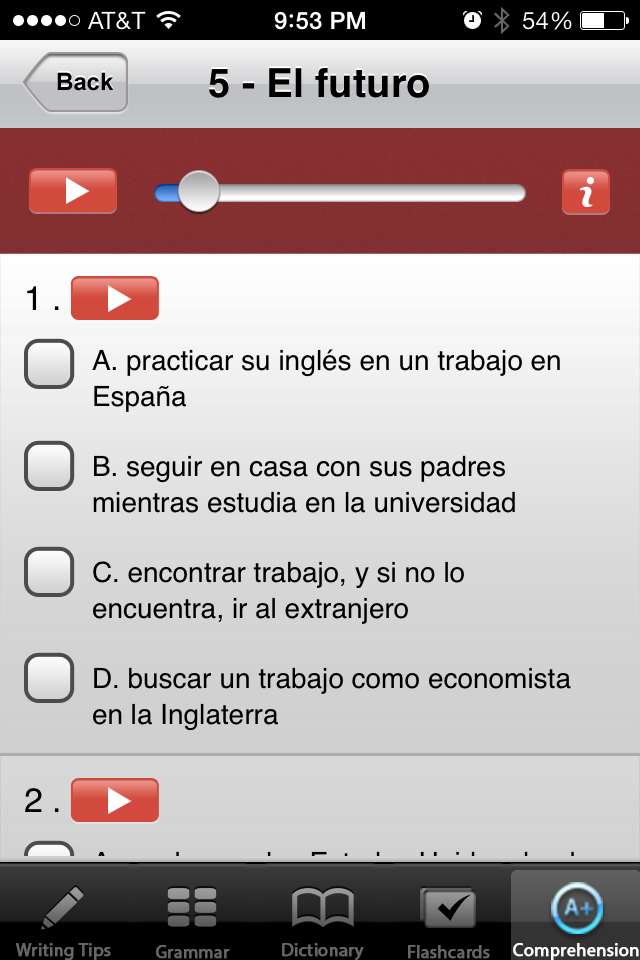
The quizzes also provide the student with very useful feedback that can be used for self-correction.


For those teachers and students that are fans of Quizlet, there is an available in-app-purchase to add Quizlet into the app.

Pros:
- Good quick reference resources
- Writing Tips
- Targeted to students in AP Spanish classes
- Grammar Helps
- Verb tenses and conjugations
- Parts of speech
- Excellent collection of vocabulary
- Customizable lists for flashcards
- Audible pronunciation guides
- Flashcards
- Customizable lists
- English to Spanish / Spanish to English
- Definitions
- Grammar
- Quick reminders/tutorials for grammar
- Conjugation reference
- Tense Explanations
- Comprehension checking
- Reading quizzes and practice questions levels 1-5
- Listening quizzes and practice levels 3-5
- Hints and self correction features provide students with instant feedback.
Cons:
- App cannot be purchased and used on the spot. Takes 5-10 minutes to download and sync dictionary terms.
- Pronunciation feature in dictionary requires an internet connection (understandable when you take into account the amount of data this app already has.
- Not connectable to class or teacher. I'd like to see this app have a classroom feature where the teacher can push vocabulary lists to the students in his/her class.
- $4.99 is a bit steep for many students/schools.
- Not Android compatible
All in all, I am impressed with this app. I would recommend it to any student enrolled in high school Spanish. I'd like to see an Android version, cheaper price tag, and some type of connectivity to the classroom teacher. However, the current features of this app make it a very good choice for students and parents to supplement the classroom curriculum.
If you or your students have used this app I'd love to hear what you think.


