Thursday, January 30, 2014

Disrupt Teacher of the Year Program


courtesy OpenClips via Pixabay.com
If you're a geek like me, you know that the goal of the tech industry is to disrupt markets, industries and other things that are due for a change.  As a technology director and facilitator, it's my goal to carry on this disruption in education.

The "Teacher of the Year" program is frankly a political joke that lacks any substantial merit. I want to create an awards system to recognize an array of accomplishments, lessons, and innovations of teachers. Teaching is a creative and dynamic art. We need awards based on the very traits we want our teachers to exemplify.

I'm thinking we should create awards like:
  • Most Innovative Lesson of the Year
  • Most Relevant Lesson of the Year (lesson has real application to our students and their surroundings)
  • Best Technology Integrated Lesson of the Year
  • Most Collaborative Lesson of the Year
  • Best Skype (video chat) Activity of the Year
  • Best Use of an Interactive Whiteboard
  • Best Internet scavenger hunt/webquest of the year
  • Most influential teacher of the year.
  • Highest Klout score in the district (then again maybe not)

This could be an awesome incentive to inspire teachers to innovate, connect, and contribute.

What about you?  Do you think it would be fun?  Would it work? What awards would you add?

Wednesday, January 29, 2014

Creative Commons Posters (Part I)

I've been doing a lot of work on Copyright, Fair Use, and Creative Commons this week.  And you all know that this subject is about as fun as a kick in the head. In fact, a kick in the head is probably what it takes to understand licensing and attribution.

The more I thought about this subject, the more I thought classrooms and libraries could use some reference posters to help students and teachers understand the rights granted under the Creative Commons. The information on this poster was taken directly from the Creative Commons website with minor editing.

I have licensed the poster under Creative Commons, so feel free to download, print, and share.

You can download the poster here in .png format and pdf format. It is meant to be printed as 11X17. 

This is the first in series of posters on the Creative Commons, Public Domain, and proper attribution. Check out poster #2, a quick reference guide for students and teachers to find CC and other reusable content.

Wednesday, January 22, 2014

Kollaborate.io

Have you tried Kollaborate.io? Kollaborate.io is a fun little collaboration tool. Think of it as cross between Google Hangouts (multi-way video chat) with canvas-like collaboration (like Prezi).

The center of the interface is a scalable canvas, much like Prezi. On top of the canvas users can import documents, videos, and images. A really unique feature to this tool is the ability to hold text-based conversations around each item placed on the canvas. To add some frosting to the cake, they have also added the ability to draw on the canvas, and display webcam video from all participants (like Google Hangouts).

Videos can be added directly from YouTube with a search widget built into the page. Likewise, Google Images and Flickr images can also be added easily. Files are uploaded from your computer in various images files and .doc, .ppt, and .pdf formats.


If I could improve this tool, I would add the ability to edit documents in real-time with my teammates. It would also be nice to watch the YouTube videos together. As is, each user plays the video on their own and watches it by themselves.  There are definite advantages to both.

If you or your students are looking for a fun tool that will give you a unique collaboration experience this one is definitely worth a try. 

Thursday, January 16, 2014

Filter Google Images by Permissions

This last week Google added the ability to filter Google Image search results by licensing and permissions. With filtering tools this easy, every teacher should be showing students how to use images appropriately.


Wednesday, December 11, 2013

High School Spanish App Review

This week I was able to go back to my own content area and review an iOS app for High School Spanish. The app is called "High School Spanish - 5 Essential Tools to Study Spanish & Learn Vocabulary!" By Common Ground International. 
Overview: This app is very good at what it does. For $4.99 I would recommend it to my students as a companion app to my classroom. Teachers and students should not expect it to be a stand alone app or a magic bullet. But when used with a strong curriculum, talented instructor, and ambitious student, this app is one of the best apps I've seen for Spanish students enrolled in Spanish levels 1 through 5. 

Upon first launch, the app brought me to the screen below. It seemed to be downloading the dictionary onto my iPhone. While connected to wifi this download/sync screen lasted for about 5-10 minutes.


The app has 5 main sections or tools.  They are all represented in the 5 icons at the bottom of the screen.  The dictionary is pretty cool it has a very comprehensive library of vocabulary words. The user can click the speaker icon on any word to hear proper pronunciation. It seems that this feature requires an internet connection to stream the pronunciation. Clicking the checkmark icon enables the user to copy that word into a user-made folder of vocabulary words.


The Writing Tips tool contains tips and instructions to help students with writing in specific circumstances. I think this would be a nice reference guide for students taking AP classes.


The grammar tool is a collection of explanations and text-based tutorials on the grammar elements seen below.


The conjugations section of the app not only includes explanations of the tenses, but also includes T-charts to assist students in memorizing the verb conjugations


The flashcard app is one of the most customizable features in this app.  There are lots of categories and folders of vocabulary words. 


Once a vocabulary folder has been selected, the user can swipe through the words in either Spanish or English.  Double-tapping on any card will flip the card to reveal its equivalent in the other language. When a word has been learned, the student can click the checkmark icon to mark this word as "learned." This removes the word from list.


The user can also add their own vocabulary words and organize existing words into personalized vocabulary lists. 


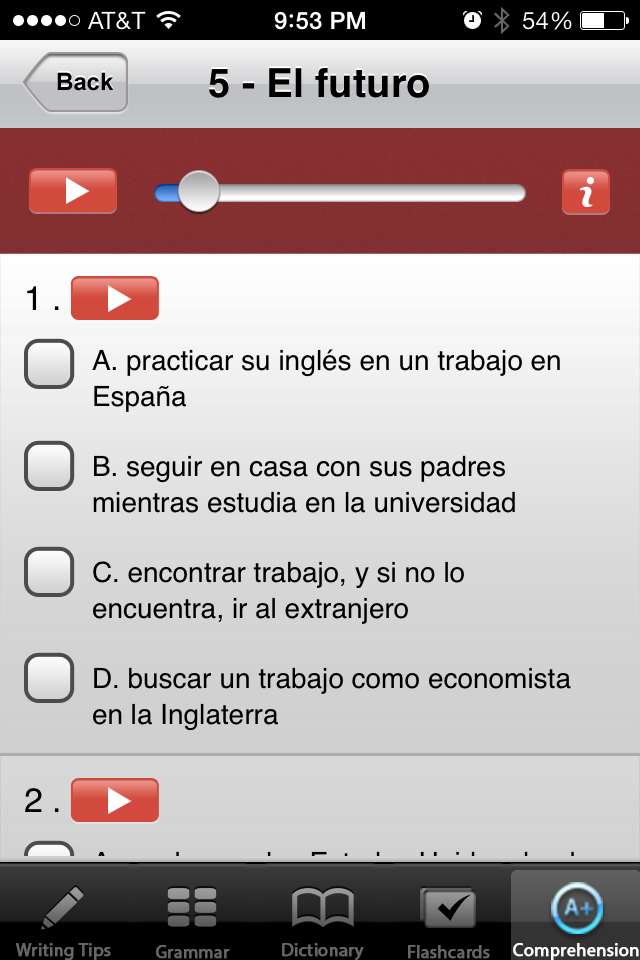
The final tool is the comprehension tool. The comprehension tool is full of tests and quizzes that students can use to quiz themselves and test their abilities. The quizzes include listening comprehension complete with audio prompts and questions. The reading quizzes are aligned to Spanish levels 1-5. The listening quizzes are aligned to Spanish levels 3, 4, or 5.


The quizzes also provide the student with very useful feedback that can be used for self-correction.


For those teachers and students that are fans of Quizlet, there is an available in-app-purchase to add Quizlet into the app.


Pros: 
  • Good quick reference resources
    • Writing Tips
      • Targeted to students in AP Spanish classes
    • Grammar Helps
      • Verb tenses and conjugations
      • Parts of speech
  • Excellent collection of vocabulary
    • Customizable lists for flashcards
    • Audible pronunciation guides
  • Flashcards
    • Customizable lists
    • English to Spanish / Spanish to English
    • Definitions
  • Grammar
    • Quick reminders/tutorials for grammar
    • Conjugation reference
    • Tense Explanations
  • Comprehension checking
    • Reading quizzes and practice questions levels 1-5
    • Listening quizzes and practice levels 3-5
    • Hints and self correction features provide students with instant feedback.
Cons:
  • App cannot be purchased and used on the spot. Takes 5-10 minutes to download and sync dictionary terms.
  • Pronunciation feature in dictionary requires an internet connection (understandable when you take into account the amount of data this app already has.
  • Not connectable to class or teacher.  I'd like to see this app have a classroom feature where the teacher can push vocabulary lists to the students in his/her class. 
  • $4.99 is a bit steep for many students/schools.
  • Not Android compatible


 All in all, I am impressed with this app.  I would recommend it to any student enrolled in high school Spanish.  I'd like to see an Android version, cheaper price tag, and some type of connectivity to the classroom teacher.  However, the current features of this app make it a very good choice for students and parents to supplement the classroom curriculum.

If you or your students have used this app I'd love to hear what you think.