- Give each group a different color pen have them add one or two key bits of info to a log book within the cache that pertain that P.o.I. (dates, battles, vocabulary, etc) Then make the info in the log books available for students to do other activities.
- Place information about the P.o.I. inside each cache. Then give the students a worksheet/quiz that has questions about each point. They can answer the question with the info inside of the cache.
- Give each student a camera & have each group take a picture/video of something that relates to the P.o.I.

Showing posts with label LOTE. Show all posts
Showing posts with label LOTE. Show all posts
Wednesday, April 14, 2010
Geocaching Lesson: The Virtual Map
Virtual map - Imagine that one of your athletic practice fields is like a map. Plot points on the map that correspond with your unit. The Points could represent battles, countries, cities, or other points of interest (P.o.I.). Then choose one activity below:


Tuesday, April 6, 2010
Hello-Hello.com
hello-hello.com has got to be one of the coolest new websites I have seen for Language Learning. It's also endorsed by ACTFL. To make it 'awesomer' they just released an app for iPad for $4.99. So here is my attempt at a preview:
Home


- Register for free (validate via email addy)
- Create a profile
- Find/invite friends (Classmates & teachers)
- Send messages

- Lessons are pre-loaded
- Lessons follow ACTFL (Beginner, Intermediate, Advanced)


- Written/recorded responses are made available for friends to evaluate & provide feedback

- Student becomes the teacher
- Evaluate others speaking or writing
- Leave feedback via text or audio recording
Communicate

- Chat with your friends in the target language
- (Haven't been able to test this yet)
This would be a great website to get your entire class registered on. It could be a weekly computer lab activity. I really like that it has the student taking the role of student & teacher.
This could also be a really inexpensive alternative to a language lab!
Give a try and let me know what you think.
Update: I received an email from Sarah the founder of hello-hello and she gave me a presentation to share with teachers. There are some great ideas for teachers on slides 7-12, including connecting your class with a class from a country in your target language.
Monday, March 29, 2010
iPod Touch as Language Lab
The other day I found these iPod touch mics on Amazon.com for $.50 (+3.50/shipping...don't get me started.) I wanted to try one out and see if I could find an audio app to go along with these so that we could turn our set of iPods into a Language/audio Lab. Language Labs are extremely useful and crazy expensive ($70,000+). So I figured it was worth a shot to find an alternative.


After some searching for a good app I stumbled across Audioboo. This a free app that let's you record an audio file they call a 'boo.' Then you can publish it to their website audioboo.fm.


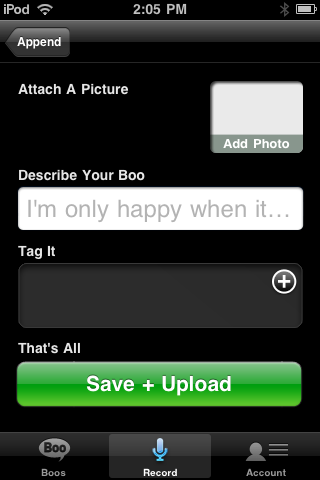

To use it as a Language/audio Lab:
- Go to Audioboo.fm
- Create a free account
- Download the app onto each iPod
- Enter audioboo.fm account credentials to link to your account
- Record the boo
- Publish the boo
- Play all your boos from the website, embed them in a blog, etc
- Giving an interview
- Ordering at a restaurant,drive through, etc
- Introducing someone
- Describing person, place, or thing
- Telling a story,
- "Interrogation Scene" using the past tense.
- Giving directions (over the phone)
- Poetry reading
Have other ideas...Share them as a comment below.
Tuesday, March 2, 2010
byki flashcards for language learners
Yesterday, I had one of my co-workers ask me if I had seen byki? I hadn't heard of it before, but I was glad she introduced it to me. I really think it is very useful.
Byki is a flashcard program for learning languages. Here are some of the features that I love:
- 3 step flashcards:
- Step 1 - see (target language) & English, listen to the vocab in TL
- Step 2 - see/hear TL; provide English
- Step 3 - see English; provide TL; listen to TL

- There are a dozen or so lists/lessons preloaded
- You can upload your own vocabulary lists (see byki help menu for instructions)
- Toggle sound for slow playback.
- Progress tracking.
- Vocabulary list sharing.
Below is a quick video preview of what it looks like and how it works.
Subscribe to:
Posts (Atom)