Showing posts with label google docs. Show all posts

Monday, October 3, 2011

Grading/Commenting on Google Docs...

Here are a couple of suggestions for teachers who would like to grade Google Docs within Google Docs:

Inserting Comments:  This feature is especially nice if the teacher does not wish to place any text on the document itself.  Thereby leaving the student's work intact while at the same time offering suggestions and coaching in the sidebar.

Here's how:
  1. Click and drag over a section of text in the document
  2. Right-click and choose >Comment


The text you selected will become highlighted and a box will appear on the right for your to type your comments into.


This new thread of comments will be linked to the highlighted text.  If the comment is clicked on the highlighted text will change from yellow to orange.


If using comments for help with revising a paper, when the problem is fixed you or the student may click "Resolve" to make the comment and the highlighting go away.


Don't worry, a history of all comments is saved and can be re-opened here:


Posting a grade: I recommend coming up with a location, like the title or student's name on the document, where you can post a comment to and enter the student's grade for the assignment.


Do you have any other suggestions for grading a Google doc?  Please share.

Thursday, March 24, 2011

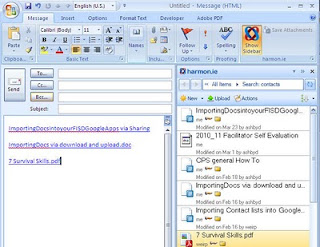
Harmon.ie: Google docs in Outlook

If you are a Google docs user, Harmon.ie is a sweet little addon that you can install on your computer if you use Outlook. It places all of your Google docs in a sidebar. You can then 'attach' any of your Google docs via drag and drop. This places a link in the email instead of the actual document. Saving valuable storage space in your email account.


Give it a shot, it's a big time and space saver.

Friday, March 4, 2011

Google spreadsheets auto fill & lookup

Google docs has a couple hidden features that are really cool.

Auto fill

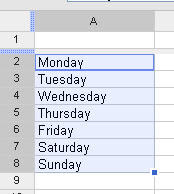
Google spreadsheets can predict patterns and complete them for you.
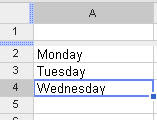
For example; if I type into one column the following words:
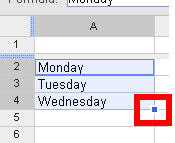
1.Type words 2. Select cells 3. Hold alt key & drag handle down to auto complete the pattern.


Google Lookup:

Google can lookup information on the web and bring into your spreadsheet.
In the example below I used the auto fill to enter my states into the column A. Then I entered the following formulas: =GoogleLookup("entity", "attribute")


Repeat steps for autofill (ctrl + click & drag)


The end result is a spreadsheet full of data that would've taken me an hour or so to lookup and transfer into my spreadsheet.

Give it a try and pass on any other tricks that you find in Google docs.

Thursday, March 11, 2010

1 line biography project

Students/classes collaborate to gather information on a subject they are studying. In Taboo fashion, students can't repeat any info that has already been given.

The beginning of the biographies are usually facts that come out of their textbook or the usual facts that everybody knows, but as it grows the entries begin to come from different sources and are lesser known facts. If you do this with multiple classes (lots of students), then you are going to have a pretty in-depth biography when it’s finished.

The steps & rules are simple:

  • Create a wiki (Google doc, blog, etc) with one page for each person or subject for which the class will study.
  • Each student contributes one line of info while also citing their source.
  • Once a piece of information has been posted it cannot be repeated. Just like Taboo, students must avoid repeating facts/info.

Once the project is completed your class will have a rich resource that could be used as a study guide or an information source for another project/report.

Subject specific lesson ideas:

English - Author's biographical info.; key points in plot development; examples of a writing style (X) from book/author;

Social Studies - Life of historical figure; war/battle facts; possible causes of the Great Depression;

Science - facts about body sytsems; Biomes

Health/PE - Habits & tendencies that contribute to a sedentary life-style; rules of golf, tennis, etc; list of sports/activities that are life-long;

Foreign language - phrases used in a restraunt (scenario A, B, C);

Have more ideas? Please share by leaving a comment below.